We connected Mistral AI to Zoho CRM to explore what happens when an AI assistant can do more than answer questions. But the possibilities go much further, from working across business applications to helping design and implement new processes.
Imagine finishing a customer meeting and asking an AI assistant to update the relevant records in Zoho CRM, prepare follow-up tasks and remind you what needs attention.
Instead of switching between multiple screens and entering the same information in different places, the assistant could potentially help you complete those actions.
Now imagine going a step further.
What if you could describe a business problem to an AI assistant, work with it to design a better process, and then have it help implement parts of that solution?
Perhaps your team needs a new way to manage service requests. Perhaps information needs to move between different applications. Or perhaps your existing business systems need to be adapted to support a new activity.
These are some of the opportunities technologies such as Zoho MCP are opening up.
But before giving AI access to your business systems, there's an important question to ask:
What should you actually let it do?
At Appz, we think that question deserves as much attention as the technology itself.
What Zoho MCP Makes Possible
MCP stands for Model Context Protocol. In simple terms, it's a standard that allows compatible AI assistants to interact with external applications through tools.
Zoho MCP makes selected capabilities from Zoho applications and supported third-party services available to compatible AI assistants.
This means the possibilities aren't limited to Zoho CRM.
With the appropriate tools and permissions, an assistant could potentially retrieve information, create or update records and perform selected actions across different business applications.
For example, a process might involve retrieving customer information from Zoho CRM, working with relevant information in Zoho Books and preparing a follow-up communication.
But the possibilities also go beyond working with existing data.
Depending on the application and the tools available, an AI assistant may also be able to help change how business systems are configured.
For example, Zoho CRM provides MCP tools for certain configuration operations, including creating custom modules and fields, modifying layouts and configuring workflow rules.
This opens up the possibility of using an AI assistant not just to perform work within a system, but also to help develop the system itself.
Of course, the available capabilities differ between applications. Not every configuration or development task can be performed through MCP, and implementing a useful solution requires appropriate design, permissions and testing.
We recently explored the underlying technology by connecting Mistral AI to Zoho CRM.
And an interesting lesson came from something the assistant couldn't do.
The Interesting Part Was When the AI Couldn't Do Something
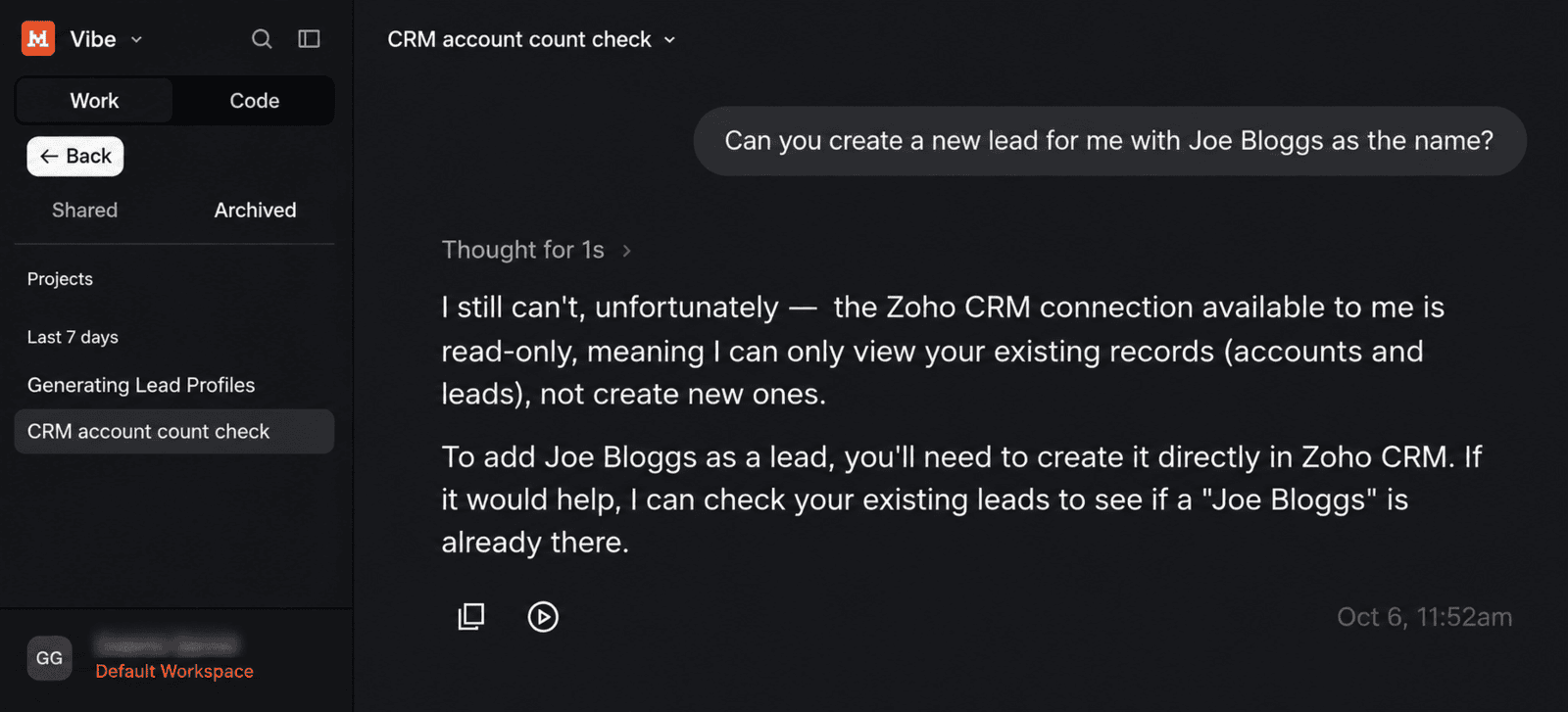
In our demonstration, we deliberately limited which Zoho CRM tools the assistant could use.
It could retrieve information, but it initially couldn't create a Lead.
This wasn't a failure of the AI model or the connection. We simply hadn't made that capability available.
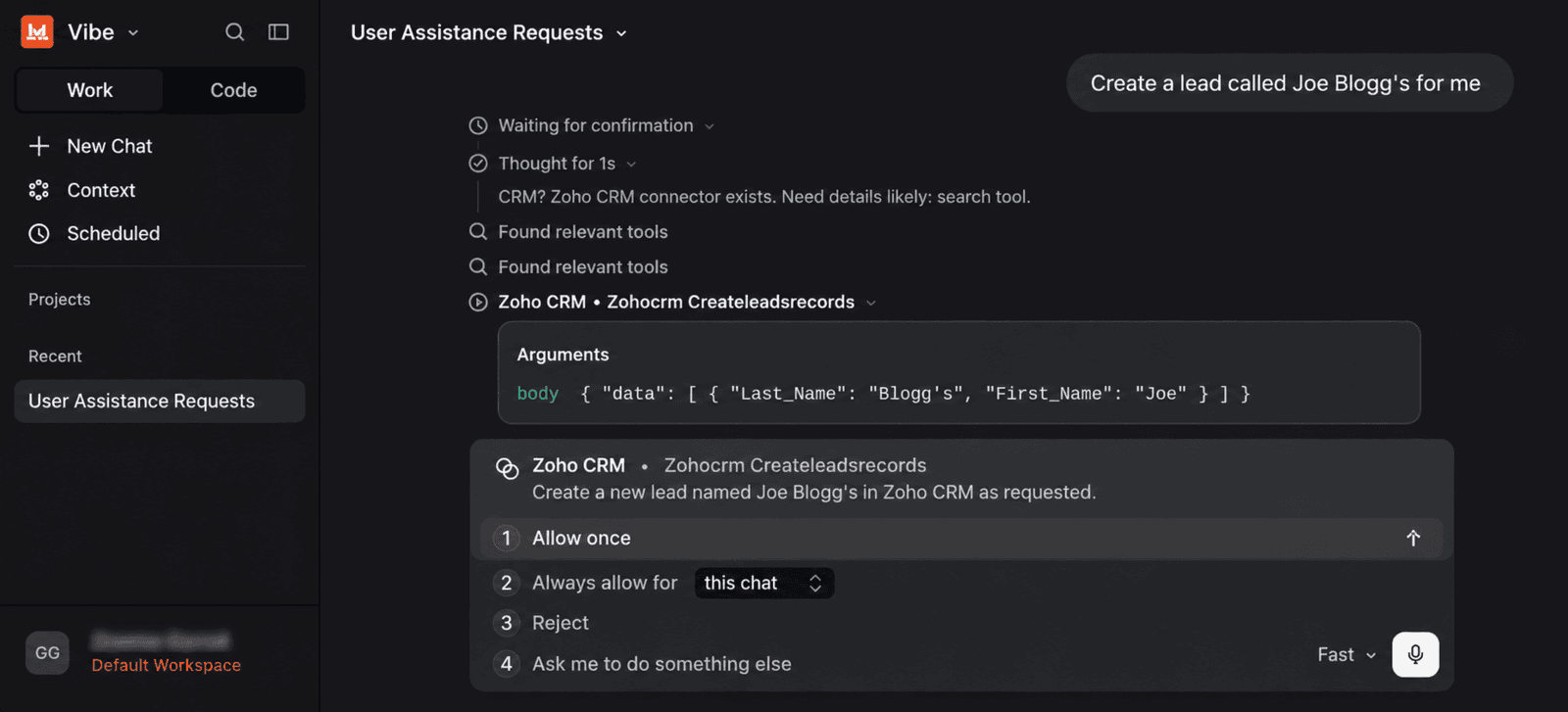
Once we added the relevant tool, the assistant could prepare the action. We had also configured it to request approval, allowing us to review the proposed change before it was carried out.
Connecting AI to your business systems doesn't have to mean giving it unrestricted access to everything.
Businesses can make deliberate decisions about which tools are available, whose permissions apply and which actions require approval.
These controls still need to be configured and tested appropriately. An approval prompt doesn't eliminate the possibility of mistakes.
The lesson is that the goal shouldn't be to give AI maximum access. It should be to give it the right access for the right task, with the right controls.
See It in Action
In this demonstration, we show how an AI assistant retrieves, creates and updates information in Zoho CRM, and how tool selection and approval settings affect what it can do.
The broader possibilities discussed below, including configuration changes and new process design, are potential applications rather than workflows demonstrated in this video.
The Bigger Opportunity Isn't Creating a CRM Record
Creating a Lead by asking an AI assistant is interesting.
But creating one Lead manually isn't usually a major business problem.
The more valuable opportunity may lie in how AI can help businesses improve everyday work, coordinate activities across applications and develop better systems and processes.
That doesn't mean every problem needs an AI solution.
Before introducing new technology, we would want to understand what's actually causing the difficulty and whether an existing feature could already solve it.
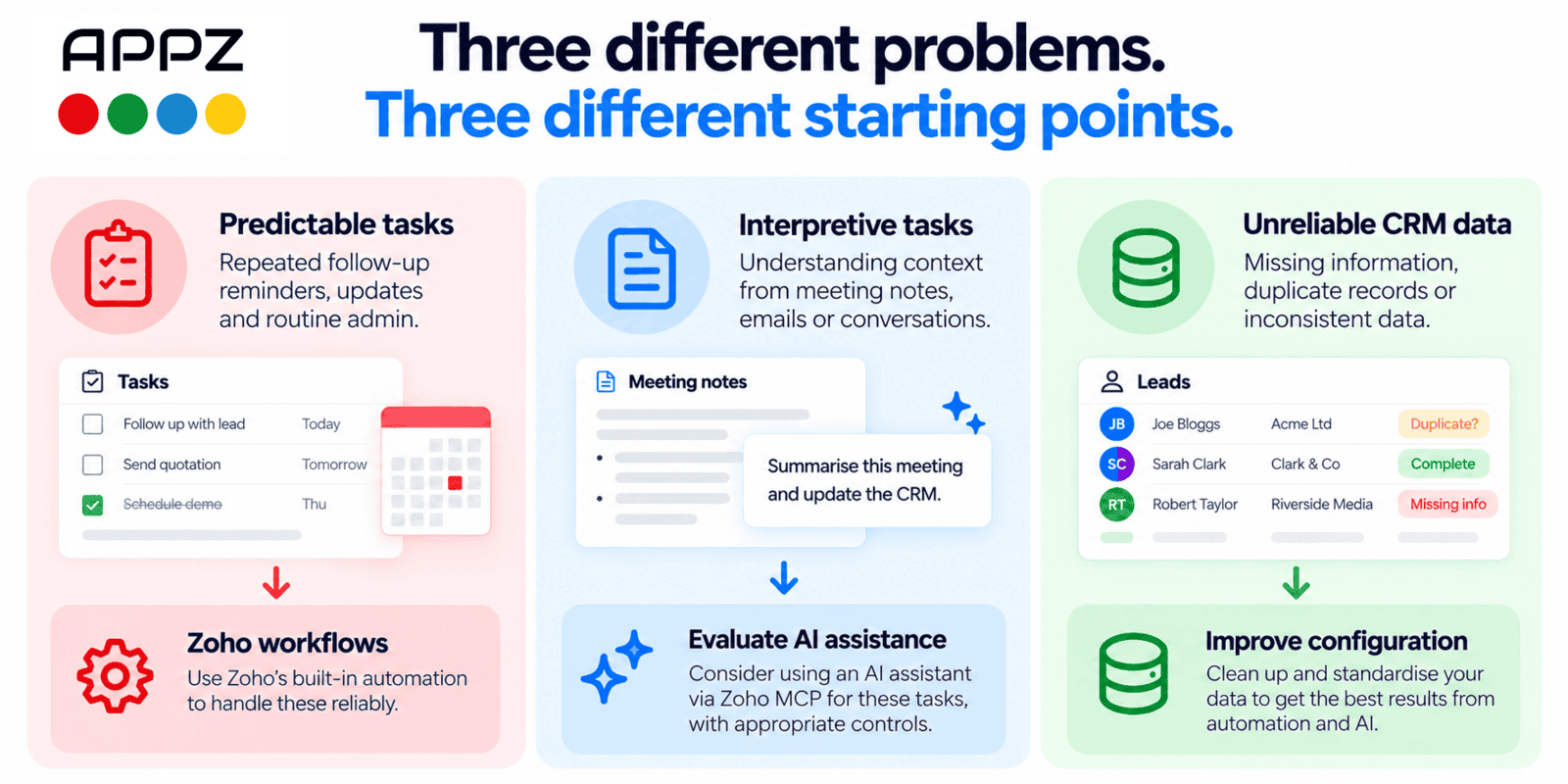
Three Different Problems. Three Different Starting Points.
1. "Our Salespeople Keep Forgetting to Create Follow-Up Tasks."
If a follow-up task should always be created when a Deal reaches a particular stage, the solution may be straightforward.
Zoho CRM already has workflow automation features that can perform actions when defined conditions are met.
An ordinary workflow rule might solve the problem reliably without involving a generative AI assistant.
The lesson: If a task follows clear, predictable rules, check whether conventional automation can handle it first.
2. "Our Team Spends Too Much Time Writing Up Customer Meetings."
This is a different kind of problem.
Meeting notes are often unstructured. Employees need to identify what's important, interpret what the customer said and decide which information needs updating.
AI may be useful because part of the work involves understanding language rather than following a fixed rule.
For example, an AI-assisted process might prepare a meeting summary and propose changes to relevant CRM fields.
An employee could then review those proposals before approving any updates.
Zoho also has built-in AI capabilities through Zia, so we'd evaluate whether an existing feature meets the requirement before introducing another integration.
The lesson: AI becomes particularly interesting when repetitive work involves interpreting information, not merely performing the same predictable action.
3. "Our CRM Information Is Unreliable."
This may sound like a problem AI could solve.
But why is the information unreliable?
Perhaps employees aren't completing required fields. Perhaps duplicate records are being created. Or perhaps the CRM isn't configured around the way the business actually operates.
Connecting an AI assistant won't necessarily fix those underlying problems. It could even make them worse if incorrect information is used or updated.
The better starting point might be improving CRM configuration, validation, duplicate prevention or the underlying process.
The lesson: Sometimes the best automation project begins by fixing the process rather than adding new technology.
What If the Process You Need Doesn't Exist Yet?
Not every opportunity involves making an existing task faster.
Sometimes the bigger problem is that a business doesn't have a suitable system or process in place at all.
Imagine a company that manages equipment servicing through spreadsheets, emails and telephone calls.
As the business grows, it becomes increasingly difficult to track service requests, equipment history, technician assignments and scheduled maintenance.
The company knows it needs a better system, but it may not know how that system should be designed or which applications would be most suitable.
This is where AI could potentially become useful much earlier in the process.
Rather than simply asking an assistant to update existing records, the business could use it to explore its requirements.
For example, it might ask:
"Help us design a process for managing equipment servicing. We need to record customer equipment, schedule maintenance, assign technicians and track completed work. What would be the best way to manage this using Zoho?"
An AI assistant could help identify the information required, suggest possible workflows and explore how different applications might support the process.
It might propose adapting Zoho CRM, using Zoho Desk or another suitable application, or developing a more tailored solution.
With the appropriate MCP tools and permissions, an assistant could potentially help implement supported elements of the design.
For example, where relevant configuration tools are available, it might assist with creating modules, adding fields or setting up workflow rules.
But there's an important distinction between implementing individual configuration changes and delivering a complete system that works reliably.
The business still needs to consider how information moves between applications, who should have access, how exceptions are handled, and whether the proposed solution meets its operational requirements.
Not every necessary function will be available through MCP, and some implementations will require additional development or integration work.
The opportunity isn't simply to automate what employees already do. It's to explore whether there is a better way to do it in the first place.
How to Identify a Worthwhile AI or Automation Opportunity
Think about an activity or requirement in your business, whether it currently happens in Zoho, another application, a spreadsheet or entirely manually.
Then ask five questions.
1. What Are We Trying to Achieve or Improve?
Start with the business requirement.
Perhaps your team spends too much time updating records. Perhaps information doesn't flow between applications. Or perhaps you need a new way to manage an activity that isn't supported by your current systems.
Be specific about what isn't working and what a better outcome would look like.
2. Could an Existing Application or Feature Solve It?
Before building something new, check whether an existing Zoho application, workflow, Zia capability or standard integration already addresses the requirement.
3. What Type of Solution Might Be Needed?
A predictable task may be best handled through conventional automation.
A process involving natural-language instructions or interpreting unstructured information may benefit from AI assistance.
A requirement spanning several applications may call for integration.
And a missing business capability might require changes to an existing application or the development of a new solution.
Understanding the nature of the problem helps determine the appropriate starting point.
4. What Could Go Wrong?
Consider the consequences of incorrect information, changes to the wrong records or unsuitable system configuration.
Operational actions and configuration changes can both have consequences for the business.
Decide which permissions, approval steps, testing arrangements and safeguards would be appropriate.
5. How Will We Know the Solution Improves the Business?
Don't measure success simply by whether an AI assistant can perform the requested action.
Consider whether the solution saves employee time, improves accuracy, reduces delays, provides better information or makes a previously difficult process easier to manage.
A small, carefully designed pilot may reveal more than an impressive demonstration.
The Real Question for Businesses Using Zoho
There is a tendency to approach new technology by asking, "What can we do with this?"
That's understandable, particularly when AI capabilities are developing so quickly.
But for a business, a more useful question is:
"How could the way we work be improved, and what's the best way to make that happen?"
Sometimes the answer will be an existing Zoho feature.
Sometimes it will involve conventional automation, a better integration or changes to how an application is configured.
And sometimes an AI assistant connected through Zoho MCP may offer a useful new approach.
That could involve interacting with business information, coordinating work across applications, helping configure supported application features or assisting with the development of new processes.
The important thing is being able to distinguish between those situations.
At Appz, that's how we believe AI and automation projects should begin: with the business requirement, not the technology.
Helping Businesses in Malta Make Better Use of Zoho and AI
At Appz, we work with businesses in Malta and beyond to improve how their business applications and processes work together.
Whether you're looking to make better use of Zoho, connect existing systems, develop a custom application or explore opportunities involving AI, we can help you evaluate the options and implement an appropriate solution.
If you're based in Malta and have a business process you'd like to improve, we'd be happy to discuss your requirements.
Could Your Business Work Better with Zoho and AI?
Perhaps your business still manages important activities through spreadsheets and emails. Maybe information needs to move between different applications, your existing systems no longer meet your requirements, or you have an idea for a new process but aren't sure how to implement it.
There may be opportunities to improve the way your business operates using capabilities you already have, or by exploring new approaches involving automation and AI.
At Appz, we help businesses understand their requirements, evaluate appropriate Zoho and integration solutions, and implement systems around the way they need to work.
Sometimes the answer is better configuration or an existing workflow. Sometimes it involves a custom application, an integration or an AI-assisted approach.
Tell us what you're trying to achieve, what isn't working well and which applications you're using.
We'd be happy to explore what might be possible.